


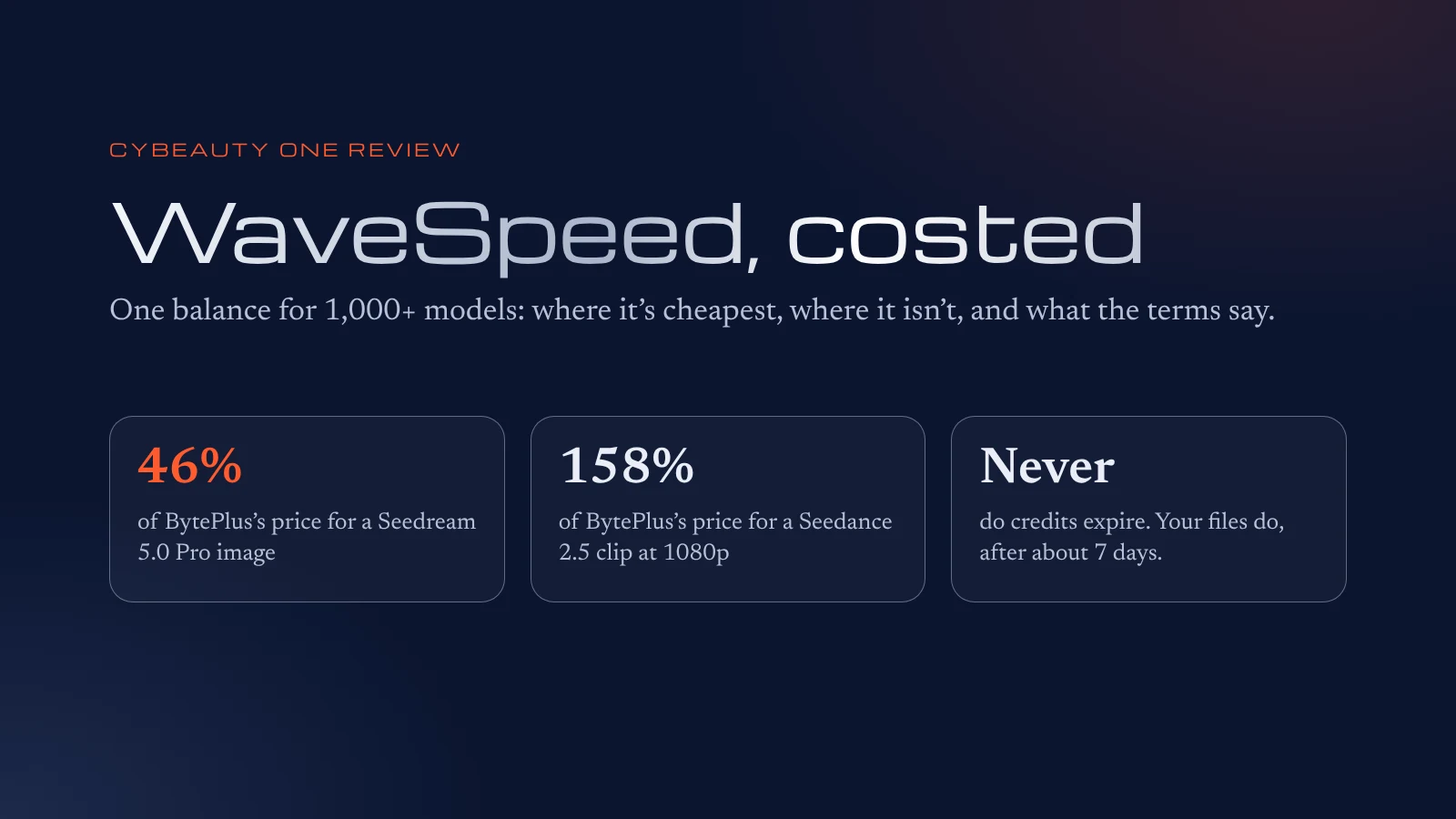
WaveSpeed is the opposite of a creator app like Higgsfield. There is no monthly plan, no credit allowance to use up and no bundle of tools built around one character. You top up a balance, pick one of more than a thousand models and pay for each generation at that model’s price. For some models that is the cheapest place we track. For others it costs half as much again as going to the source.
This review covers what WaveSpeed is, what an AI creator can make with it, how its billing works, what a usable image or clip costs compared with other platforms, how fast and reliable it is according to independent measurements, and what its terms say. We use WaveSpeed ourselves, and that section is marked separately.
Is WaveSpeed legit, and is it worth it? It is a real, registered business with public terms and working billing, and it is a good fit for creators who make content in bursts, want many models under one balance and are happy to download their files the same week. It is a poor fit if most of your video is Seedance 2.5 or Kling 4.0, which cost far less elsewhere, or if you need strong contractual protection and responsive support.
What WaveSpeed is
WaveSpeedAI is an inference platform: it runs other companies’ AI models on its own servers and sells access by the generation. The company is based in Singapore, operates through WaveSpeedAI Pte. Ltd. in Singapore and WaveSpeedAI Limited in Hong Kong, and lists 2025 as its founding year. Its founder and CEO, Zeyi Cheng, built the open-source speed-up projects stable-fast, ParaAttention and Comfy-WaveSpeed; its CTO is David (Yangbing) Li. It announced a multi-million-dollar angel round without naming the amount or the investors.
The catalogue is the selling point. WaveSpeed claims more than 1,000 image, video, audio, 3D and language models, including Google’s Veo 3.1 and Nano Banana, ByteDance’s Seedance and Seedream, Kling, Wan, Grok Imagine, MiniMax and many open models, all through one account, one balance and one API key. It also claims sub-second inference, no cold starts, 99.99% uptime and more than a million users, and names Freepik and MiniMax among its partners. Those are the company’s own figures.
How we use it
We use WaveSpeed today, in our own work at Cybeauty One and on client projects, alongside other platforms. It is also the reason we applied to its affiliate programme. That use is why we checked its prices, billing rules and terms closely for this review; the figures below come from those checks and from published sources, not from our own usage records.
What an AI creator can make with it
For most of its life WaveSpeed was a developer tool, and older reviews still describe it as unusable without code. That is no longer accurate. In November 2026 the site has a browser Image Generator and Video Generator, where you pick a model, fill in its settings and press Run, with your results kept in a History page.
For AI influencers, the most relevant addition is AI Influencer Studio. You choose a look, or start from a preset character, and the studio creates a fictional persona, then uses that portrait as the reference image for every photo and video. Nano Banana Pro makes the photos, and videos default to MiniMax H3, with Seedance 2.5 available for richer motion and sound. It can make mirror selfies, gym and travel scenes, talk-to-camera clips, dance clips and product posts from an uploaded product photo. Consistency depends on the reference image rather than a trained model of the face, so expect some drift, and the studio asks you to upload a real person’s photo only with their consent.
Around that, WaveSpeed lists Cinema Studio for directing a shot with camera moves and lighting, dozens of avatar and lip-sync models, LoRA generation and training tools, upscalers for images and video, and speech, music and 3D models. WaveSpeed Desktop, for Windows, macOS, Linux and Android, adds 12 free tools that run on your own computer, including an image and video enhancer, face swapper, background remover and media converter.
If you automate your work, WaveSpeed has a REST API with Python and JavaScript examples on every model page, a CLI, an MCP server for AI assistants and ComfyUI nodes. Some web features aren’t available in the ComfyUI nodes, according to user reports.
How billing works
WaveSpeed has no subscription. You top up a balance by card, PayPal, WeChat Pay, Alipay or Naver Pay, and each generation is charged at the price shown on that model’s page. Some new accounts get a $1 trial credit, but WaveSpeed says eligibility isn’t guaranteed, and an independent cost tracker reports that a minimum deposit of about $5 to $25 is needed before you can generate video.
The rule that matters most for creators is that credits never expire. On a subscription app, credits you don’t use in a month are lost; on WaveSpeed a $20 top-up is still worth $20 in six months. If you make content in bursts, that alone can make it cheaper than a plan with a lower price per attempt. The trade-off is that credits can’t be refunded as money, except at WaveSpeed’s discretion. Its support documentation says they can be moved to another account on request, although the terms call them non-transferable.
Failed requests, system errors and system-side timeouts are refunded to your balance automatically. Results that complete but aren’t what you wanted are not, and neither are client-side timeouts in Sync Mode if the task still finishes. That matches every other platform we track: you pay for creative failures in full.
Two other rules catch people out. Generated files are temporary and generally deleted within seven days, so download anything you want to keep. And new accounts are limited until they top up:
| Level | How you reach it | Generations a minute | Running at once |
|---|---|---|---|
| Bronze | New account | 5 | 2 |
| Silver | Any single top-up under $1,000 | 500 | 300 |
| Gold | A single top-up of $1,000 to $4,999 | 3,000 | 3,000 |
| Ultra | A single top-up of $5,000 or more | 5,000 | 10,000 |
For one creator, Silver is plenty, and any first top-up gets you there. Levels only move up, and they depend on the size of a single top-up rather than your total spending.
What one attempt costs, against the alternatives
Here is WaveSpeed’s price for one attempt on the models AI creators use most, next to the model maker’s own API and the cheapest other pay-as-you-go platform we track (fal, Replicate, kie.ai, Segmind, Atlas Cloud and the makers’ APIs). All prices were checked on November 21, 2026.
| Model and setting | WaveSpeed | Model maker’s API | Cheapest other platform |
|---|---|---|---|
| Veo 3.1, 8 s, 1080p, with sound | $3.20 | $3.20 (Google) | $3.20 (Google) |
| Veo 3.1 Fast, 8 s, 1080p, with sound | $1.20 | $0.96 (Google) | $0.96 (Google) |
| Seedance 2.5, 5 s, 1080p | $4.50 | $2.85 (BytePlus, estimate) | $2.85 (BytePlus, estimate) |
| Seedance 2.5, 5 s, 720p | $1.80 | $1.16 (BytePlus, estimate) | $1.16 (BytePlus, estimate) |
| Kling 4.0, 5 s, 1080p | $1.175 | not sold | $0.55 (Atlas Cloud) |
| Kling 3.0 Pro, 5 s, 1080p, with sound | $0.84 | $0.84 (Kling) | $0.755 (kie.ai) |
| Wan 3.0, 5 s, 1080p | $1.00 | $1.00 (Alibaba Cloud) | $1.00 (Alibaba Cloud) |
| Grok Imagine Video 1.5, 5 s, 1080p | $1.26 | $1.25 (xAI) | $1.25 (xAI) |
| MiniMax H3, 5 s, 2K | $0.70 | not compared | $0.8125 (Segmind) |
| Nano Banana Pro, 2K image | from $0.126 | $0.134 (Google) | $0.09 (kie.ai) |
| Nano Banana 2, 1K image | $0.063 | $0.067 (Google) | $0.04 (kie.ai) |
| Seedream 5.0 Pro, 2K image | from $0.041 | $0.09 (BytePlus) | $0.09 (BytePlus) |
| MiniMax H3 Image, 2K | from $0.02 | not compared | $0.02 (kie.ai) |
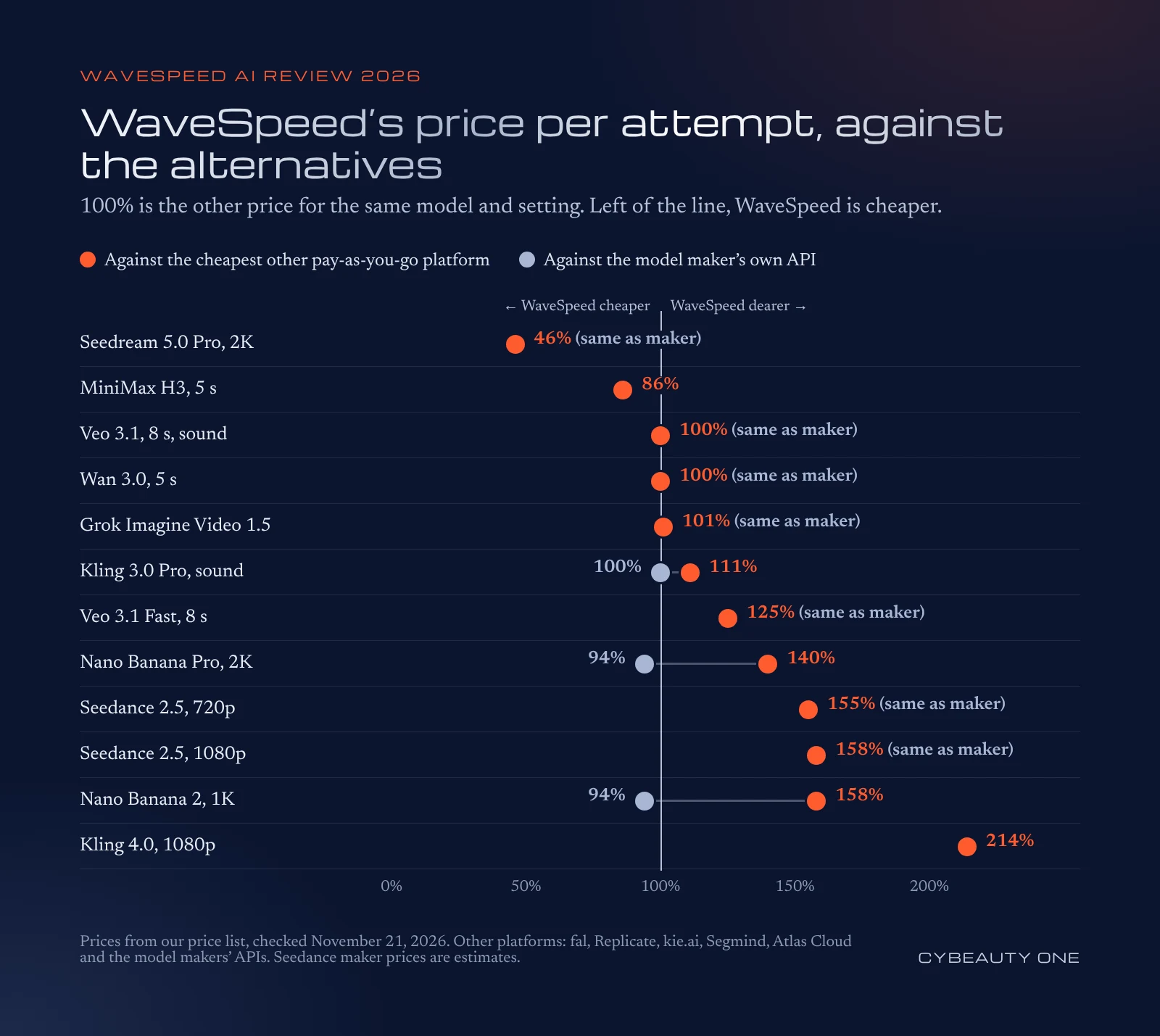
Three patterns stand out. On Veo 3.1, Wan 3.0, Kling 3.0 Pro and Grok Imagine Video, WaveSpeed charges the model maker’s own price, or within a cent of it, so you pay nothing extra for having them all in one place. On Seedream 5.0 Pro and MiniMax H3 it is the cheapest platform we track, at less than half of BytePlus’s price for Seedream. On Seedance 2.5 it costs 55% to 58% more than BytePlus, on Kling 4.0 more than twice Atlas Cloud’s price, and on the Nano Banana image models kie.ai is about 30% to 40% cheaper, though WaveSpeed still undercuts Google.
“From” marks WaveSpeed’s starting price for a model, which can include a discount; several models were about 10% off when we checked. An independent check by GenGrades in October found WaveSpeed’s Nano Banana Pro at $0.14 before the discount. ByteDance bills Seedance by the token, so the BytePlus figures are estimates. Our AI model price pages list every platform for each model, and the AI content cost calculator works out your own cost per usable output.
What a month costs
To compare WaveSpeed with a subscription app, take the same creator as in our Higgsfield review: 60 images and 20 short clips a month, keeping one image in two and needing three attempts per clip. That is 120 image attempts and 60 video attempts. The cheapest-elsewhere column leaves WaveSpeed out and may mean paying two or three different platforms.
| Video model and image model | WaveSpeed | Cheapest elsewhere, pay as you go | Higgsfield |
|---|---|---|---|
| MiniMax H3 and Nano Banana Pro (WaveSpeed’s AI Influencer Studio defaults) | $57.12 | $59.55 | $59 (Plus, monthly) |
| Kling 3.0 Pro and Nano Banana Pro | $65.52 | $56.10 | $59 (Plus, monthly) |
| Veo 3.1 and Seedream 5.0 Pro | $196.92 | $202.80 | about $200 to $250 |
| Seedance 2.5 at 1080p and Nano Banana Pro | $285.12 | $181.80 | about $197 to $250 |
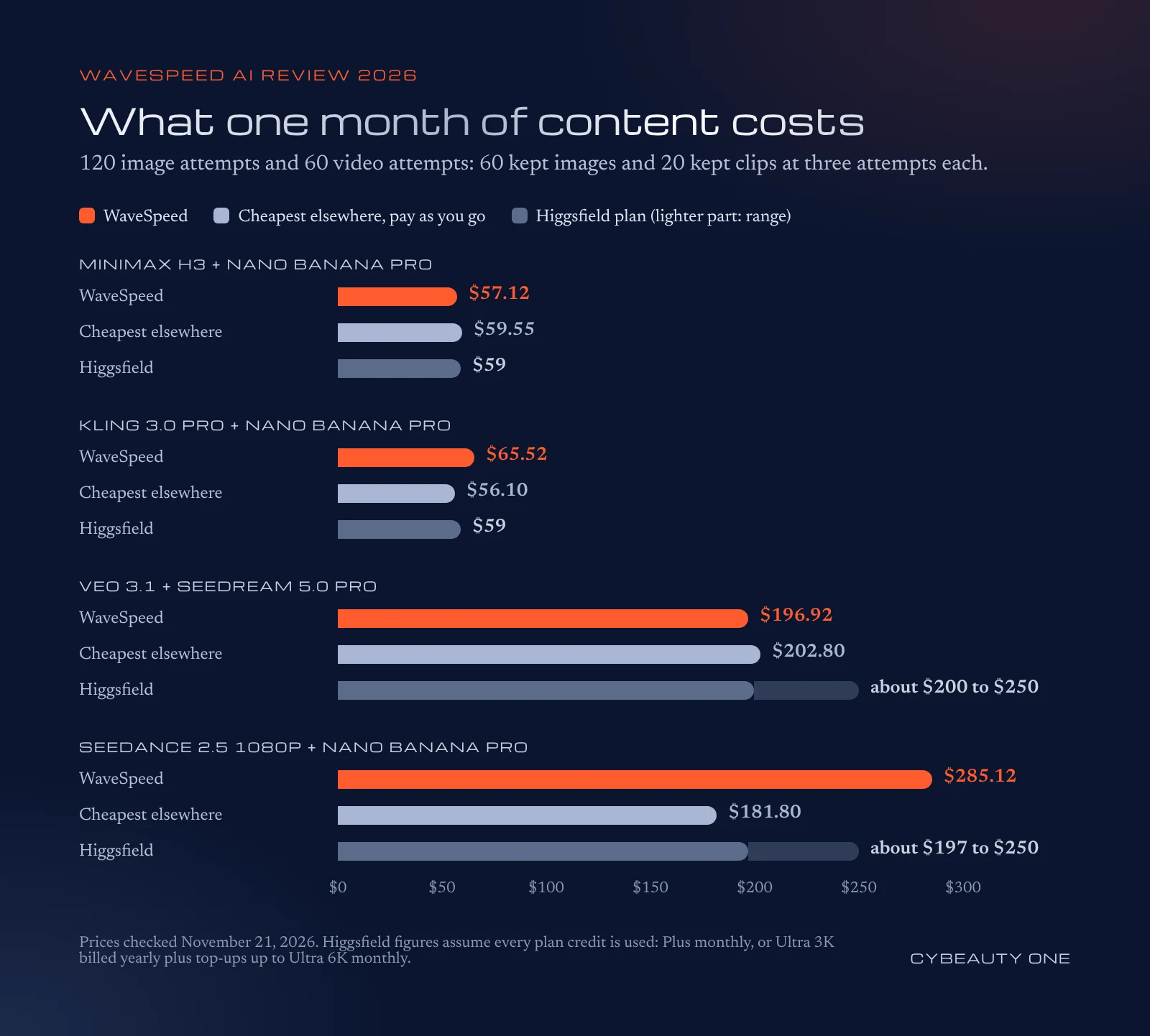
On the models WaveSpeed prices well, MiniMax H3 and the Veo 3.1 and Seedream pairing, it is the cheapest of the three, with one balance and no subscription. With Kling 3.0 Pro it is about $6 to $9 a month dearer. On Seedance it is the most expensive by a wide margin: about $103 more than going to BytePlus and kie.ai, and $35 to $88 more than Higgsfield, because its Seedance price is well above ByteDance’s own. And the comparison flatters a subscription in one way: the Higgsfield figures assume you use every credit before the month ends. If you make this much content one month and a third of it the next, WaveSpeed’s unexpired balance carries over and a Higgsfield plan doesn’t.
None of these figures include editing time, which is usually the larger cost. Our guide to what AI content really costs after the failed generations shows how to add it.
Speed and reliability
WaveSpeed’s marketing leads with speed, and the independent numbers are mixed. GenGrades read Artificial Analysis’s three-day median end-to-end times on October 21, 2026. On shared image models, WaveSpeed was slower than fal and Replicate: 11.0 seconds for FLUX.1 [schnell] against 3.2 seconds on fal and 2.2 on Replicate, and 6.2 seconds for FLUX.2 [klein] against about 1.5. On video it was faster than both on Vidu Q3 Pro, at about 106 seconds against about 117, but took about 124 seconds for a MiniMax H3 clip that fal returned in about 12.
For a creator working in the browser, a few extra seconds per image rarely matters. For an app or automation that runs thousands of jobs, it does. On reliability, WaveSpeed’s status page showed 99.966% API health on the day GenGrades checked, against 99.99% claimed on the homepage, with four incidents between July and September 2026.
What the terms say
WaveSpeed’s terms were last updated on November 1, 2026. You own your inputs and outputs: the terms say the customer “owns and will continue to own all rights, title, and interest” in its data, and WaveSpeed’s licence is limited to what it needs to provide the service. Unlike Higgsfield’s, these terms don’t give WaveSpeed a right to train models on your uploads; they allow it to use aggregated, anonymised data to improve the service. We haven’t checked whether its separate privacy policy says more. Most models allow commercial use, but WaveSpeed says model-specific conditions from the original providers can apply.
The protections for you are thin. WaveSpeed’s total liability is capped at US$100, it can suspend or end the service “immediately and without notice” for breach, legal reasons or commercial impracticality, and purchased credits are non-refundable except at its discretion. Disputes go to arbitration in Singapore, with no class actions. For a creator with a modest balance that is a reason not to keep a large one; for a team with sensitive client material it is a reason to read the privacy policy first.
On content, the web interface runs a Safety Checker by default, and the content policy bans illegal content, hateful content, child exploitation and non-consensual intimate imagery, including deepfakes. The policy doesn’t say whether consensual adult content is allowed or whether the checker can be turned off, and some models carry their providers’ own rules. Users on Trustpilot have complained about stricter filters introduced without notice. If your character sells adult content, don’t assume WaveSpeed is an exception to the filters on other platforms.
What other users report
Independent feedback is thin. On Trustpilot, WaveSpeed had a score of 2.3 out of 5 from six reviews when we checked, all of them one-star. They report a video that was unusable after a required deposit and a refund that was refused until PayPal reversed it, an auto top-up set to $15 that charged $55 twice, generations in the wrong aspect ratio, unanswered support emails, and a content flag the reviewer said was wrong. WaveSpeed hadn’t replied to any of them.
Six reviews say little about the experience of a service that claims a million users, and unhappy customers are more likely to post. But the themes match what GenGrades found, including a bug report on WaveSpeed’s MCP server that went unanswered for months. Top up small amounts, check the auto top-up setting before you turn it on, and keep task IDs for anything that fails, since support asks for them.
Pros and cons
What WaveSpeed does well, as of November 2026:
- More than 1,000 models under one balance, one account and one API key
- No subscription, and credits that never expire
- The model maker’s own price on Veo 3.1, Wan 3.0, Kling 3.0 Pro and Grok Imagine Video
- The cheapest price we track for Seedream 5.0 Pro, MiniMax H3 and Kling Image 4.0
- Automatic refunds for failed requests and system errors
- You own your inputs and outputs, and the terms limit WaveSpeed’s licence to running the service
- A browser AI Influencer Studio, plus an API, CLI, MCP server, ComfyUI nodes and free local desktop tools
- Many payment options, including PayPal, Alipay and WeChat Pay
Where it falls short:
- 55% to 58% above ByteDance’s price for Seedance 2.5, and more than twice the cheapest price for Kling 4.0
- Slower than fal and Replicate on most shared image models in independent measurements
- Generated files are deleted after about seven days
- New accounts are limited to five generations a minute and two at once until the first top-up
- A US$100 liability cap, suspension without notice and non-refundable credits
- Few independent reviews, and those that exist complain about billing and support
- Character consistency relies on a reference image, without a trained face model
Who should use it
WaveSpeed makes most sense for a creator or studio that uses several models, makes content unevenly from month to month, and wants to pay exactly for what it generates without a plan to use up. It is especially good value for Seedream 5.0 Pro images, MiniMax H3 clips and anything where you would otherwise go to Google, Alibaba or Kling directly, since it matches their prices with one balance. It also suits anyone who automates: the API and MCP server put every model behind the same few lines of code.
It makes less sense if your channel runs on Seedance 2.5 or Kling 4.0, where other platforms are far cheaper, if you want a trained character model and editing tools in one app, which is where Higgsfield is stronger, or if you need contractual protection and fast support. Many creators will end up using both kinds of service: a creator app for character work, and WaveSpeed for the models it prices at or below the source.
Start with a small top-up, which also lifts the account limits, run the same brief you would run elsewhere, and download everything you keep. Our AI Plan Picker compares WaveSpeed’s pay-as-you-go prices with subscription plans for the mix of images and clips you make.
Prices in this review were checked on WaveSpeed’s model pages and in our price list on November 21, 2026, and WaveSpeed’s documentation, terms and Trustpilot page on November 23, 2026. WaveSpeed changes its prices and discounts often, so check the model page before you run a large batch.
Free monthly email
Get the monthly price changes
WaveSpeed and the platforms it competes with change their prices every few weeks, and the new ones are rarely announced. Once a month we’ll email you what changed and where each model is cheapest to run.
Sources
- WaveSpeed, About
- WaveSpeed, Terms of Service (last updated November 1, 2026)
- WaveSpeed Docs, How pricing works
- WaveSpeed Docs, Refund policy
- WaveSpeed Docs, Account levels and rate limits
- WaveSpeed Docs, Payment methods
- WaveSpeed Docs, User guide and FAQ (file retention, trial credit, commercial use)
- WaveSpeed Docs, Content policy
- WaveSpeed, AI Influencer Studio
- WaveSpeed, Free AI tools in WaveSpeed Desktop
- MarTech Series, WaveSpeedAI secures multi-million dollar funding
- GenGrades, WaveSpeed AI review: pricing, speed tests and is it legit (checks dated October 21, 2026)
- Costbench, WaveSpeed hidden costs (verified August 22, 2026)
- Trustpilot, WaveSpeedAI reviews
- Cybeauty One, AI model prices (checked November 21, 2026)