For AI creators and AI influencer studios
AI Creator Cost & Yield Kit
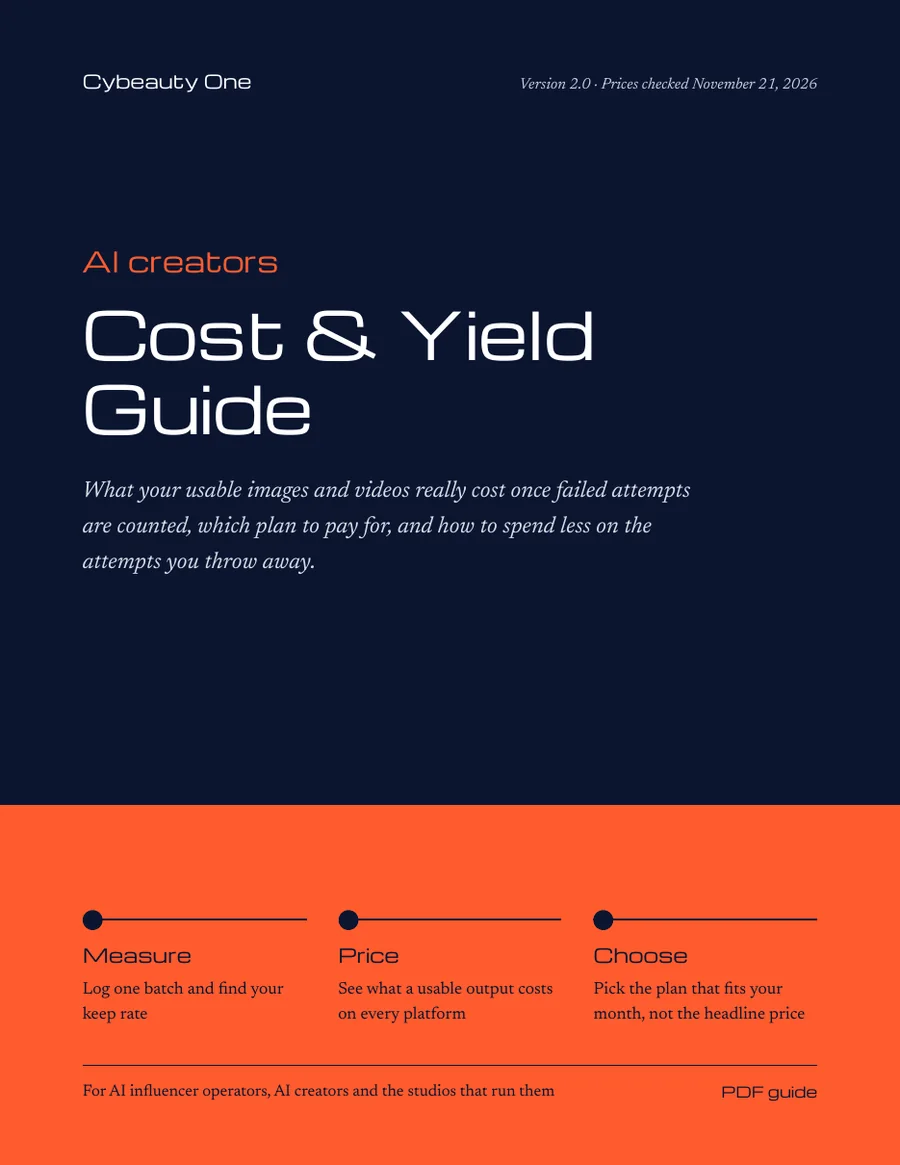
You pay for every attempt, including the ones you throw away. This kit measures what your usable images and videos really cost, shows the price of every model on every platform we track, and ranks every plan by what your month would cost.
$19
Checkout opens soon. Join the launch list and we’ll email you once when it does.
The price you see isn’t the price you pay
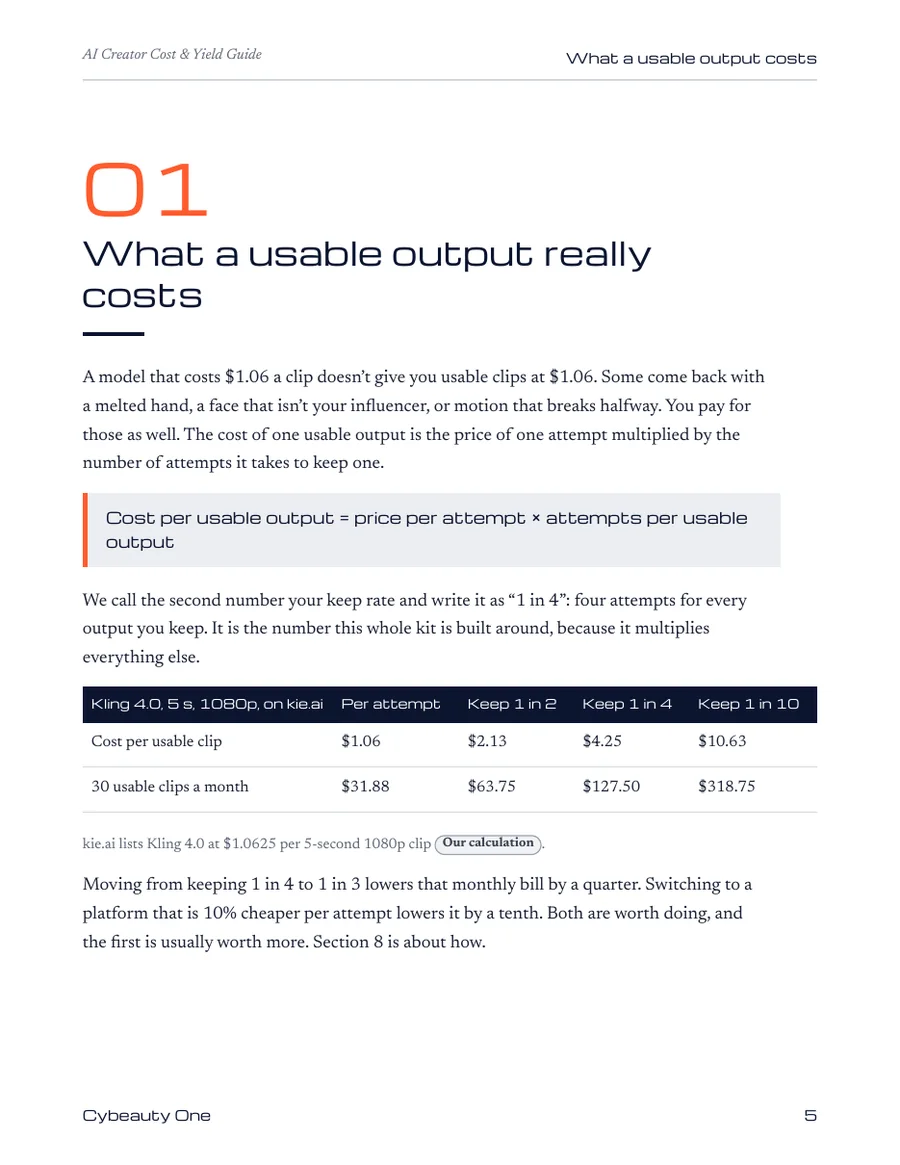
A Kling 4.0 clip costs about $1.06 on kie.ai. If you keep one attempt in four, a usable clip costs $4.25, and thirty of them cost $127.50 a month instead of $31.88. Your keep rate multiplies every price you see, and most creators have never measured theirs.
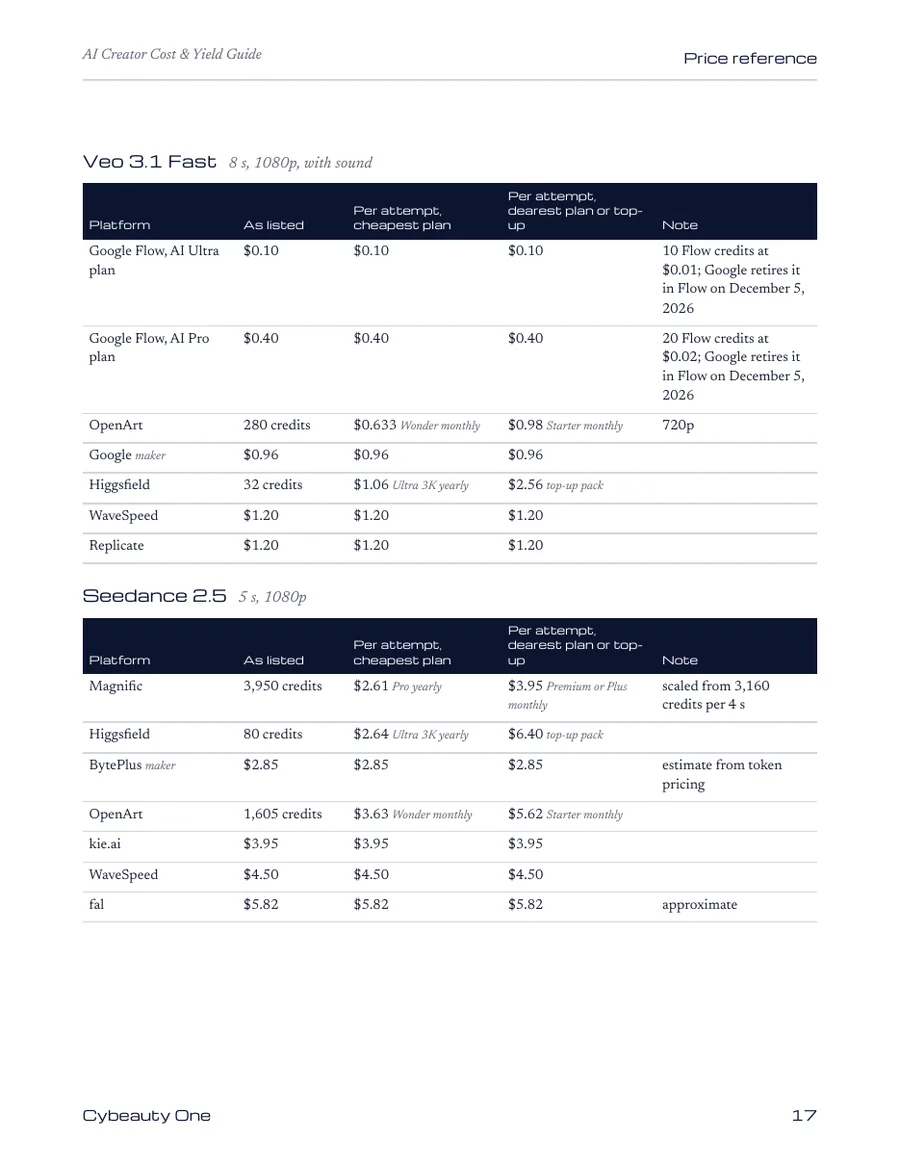
Then there is the plan. The same eight-second Veo 3.1 clip costs from $1.00 to $6.40 depending on where you run it and which plan or top-up pays for it. For a studio making 60 Kling 4.0 clips, 20 Seedance clips and 400 Nano Banana Pro images a month, the cheapest option we found costs $335.80 a month, against $419.80 paying as you go. Which plan wins changes with your mix and your volume, which is why the kit works it out for yours.
What’s in the kit
The guide
A 49-page PDF: how costs work, measuring your keep rate, the price of 23 models across 20 places to run them, how plans, yearly plans and top-ups behave, and what lowers the number of failed attempts. Clickable contents and bookmarks.
The workbook
An Excel workbook with 12 tabs. Log your batches and it works out your keep rate and cost per usable output for each model, your monthly budget, project costs and job quotes. Plan prices are already filled in.
The AI Plan Picker
An online tool. Enter your monthly mix and keep rates, and it ranks every plan, yearly plan, top-up and pay-as-you-go route by what your month would cost, with a “what if” panel and saved mixes.
Two cheat sheets
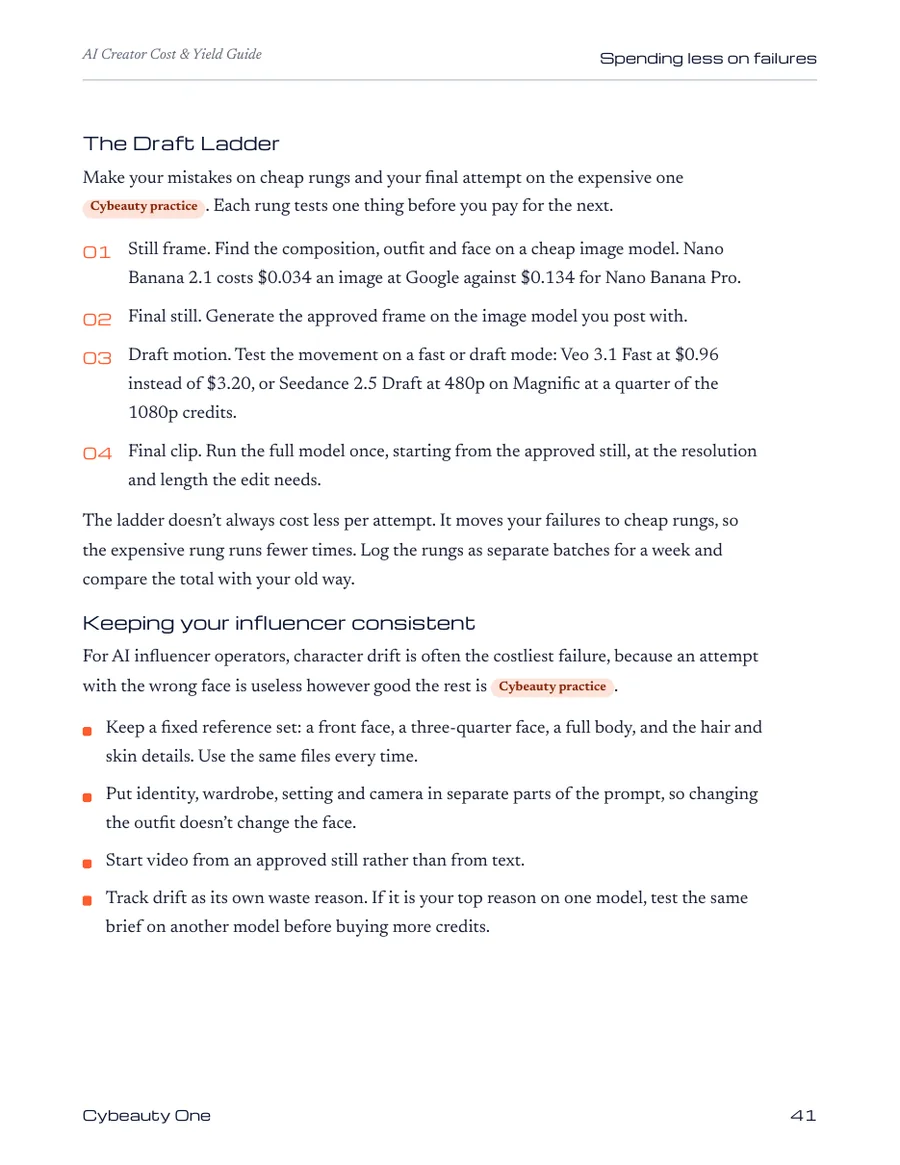
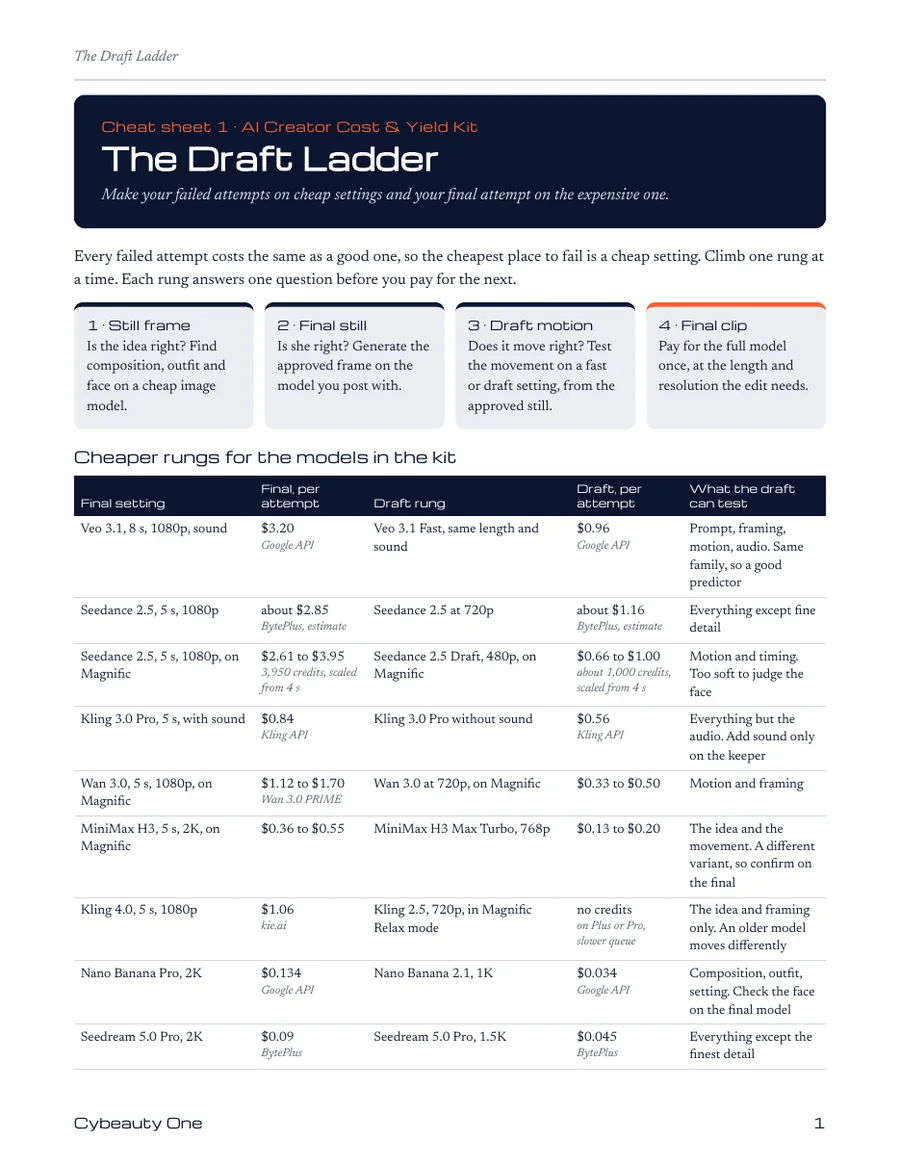
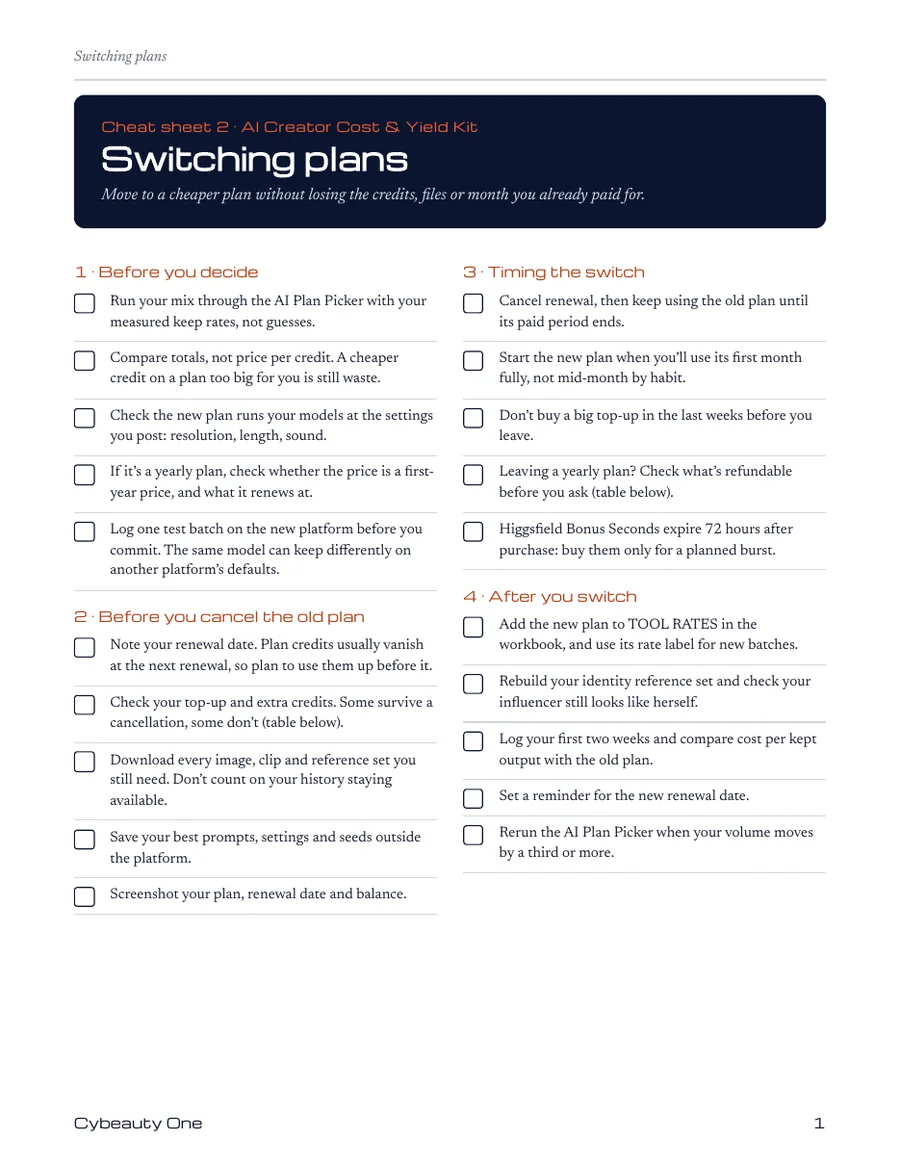
The Draft Ladder, with a cheaper test setting for nine model settings, and a checklist for switching plans without losing credits. Each prints on one sheet, front and back.
12 months of updates
The AI Plan Picker’s prices are checked every month, and the guide and workbook get a new edition each quarter, emailed to you. We also email you when a price change affects the ranking.
What the guide covers
- What a usable output really costs, with a worked example
- Measuring your keep rate, with a printable batch worksheet
- Price reference: every model on every platform, at the cheapest and most expensive plan
- What changes the price of one attempt: resolution, length, sound, draft modes, sales
- Plans, credits and top-ups: expiry, yearly plans, and when a bigger plan pays off
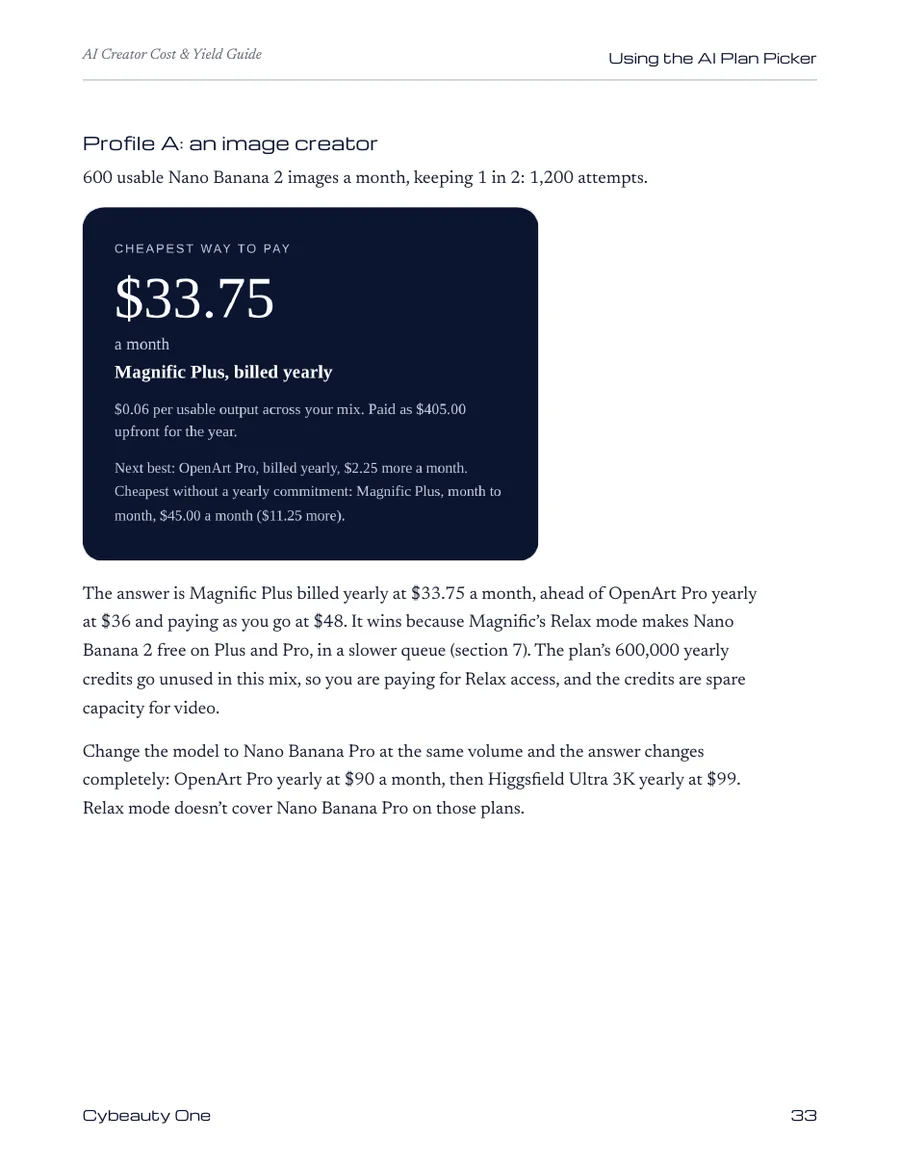
- Using the AI Plan Picker, with three creator profiles worked through
- Unlimited and Relax modes, and when they pay off
- Spending less on failed attempts: the Draft Ladder, consistency, retry budgets
- Failed generations and refunds on each platform
- Which platform at which monthly volume
- Updates, sources and your licence
Models covered include Veo 3.1 and Veo 3.1 Fast, Seedance 2.5, Kling 4.0 and 3.0 Pro, Wan 3.0, Grok Imagine Video 1.5, MiniMax H3, Nano Banana Pro, 2 and 2.1, GPT Image 2.5, Seedream 5.0, FLUX 3 and Stable Diffusion 3.5, on the makers’ APIs, WaveSpeed, fal, Replicate, kie.ai, Segmind, Atlas Cloud, Higgsfield, Magnific, Krea, OpenArt, the Kling app, Dreamina and Google Flow.
Look inside
Four of the guide’s 49 pages, as they appear in the PDF.
The AI Plan Picker
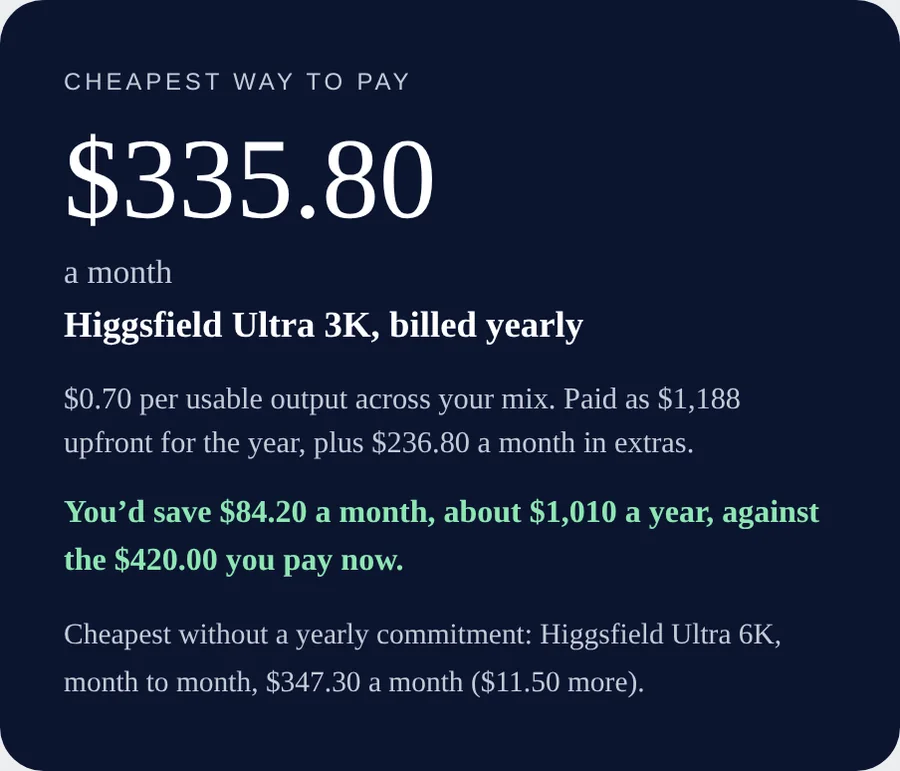
The free cost calculator answers “what does one clip cost?”. The AI Plan Picker answers “what should I pay each month?”.
- Enter each model you use, how many usable outputs you make a month, and how many attempts you keep
- It prices every subscription plan, yearly plan, top-up and Relax mode we track, and the pay-as-you-go-only route
- Each option opens to show where each model runs, what it costs and how many credits go unused
- The “what if” panel shows what failing less would save, and at what volume a different plan takes over
- Save a mix for each influencer, compare them side by side, or share a mix as a link
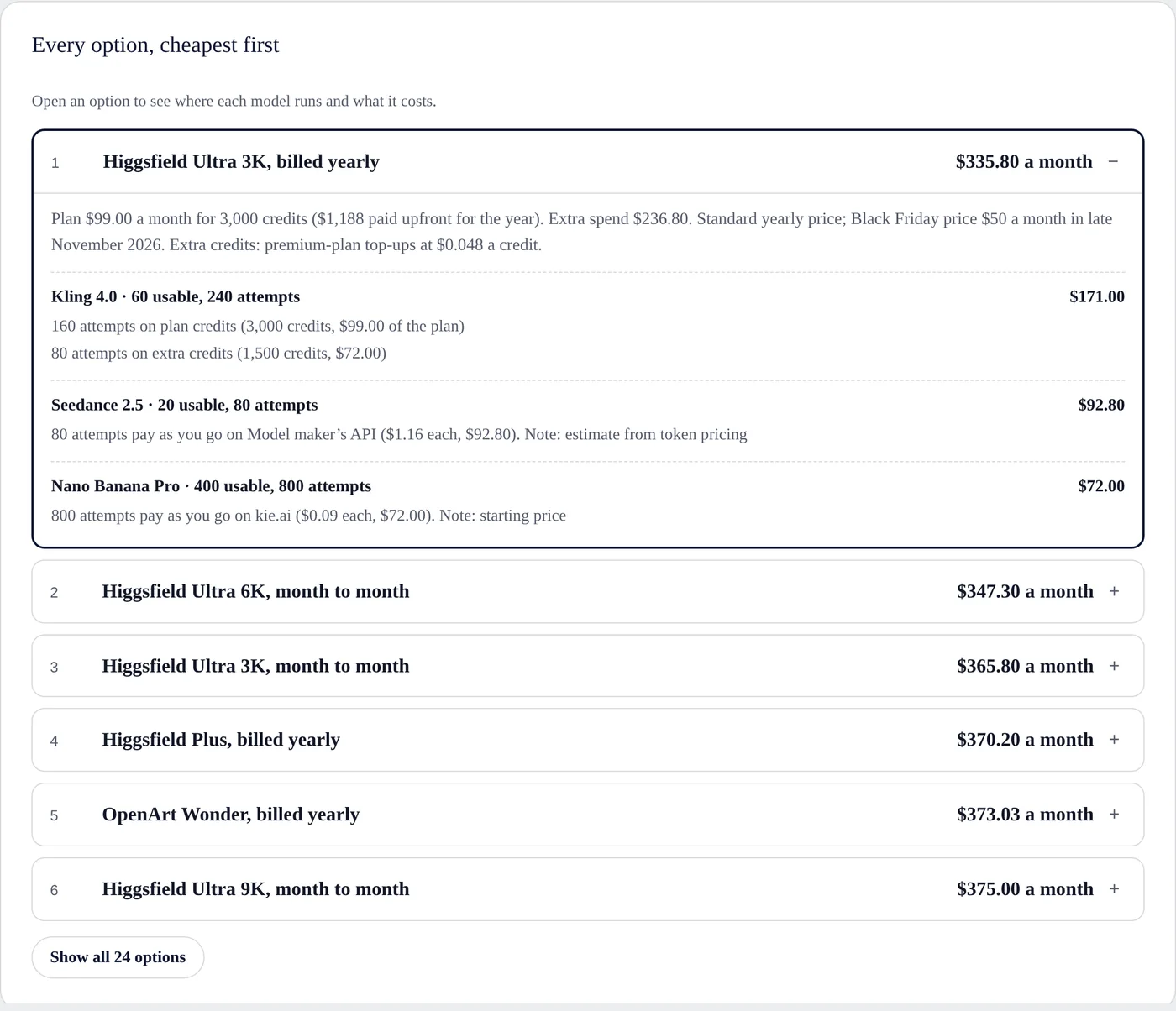
Ranked by price alone. Cybeauty One is an affiliate partner of Higgsfield and WaveSpeed and may earn a commission if you sign up through our links; that never changes the order. It runs in your browser with your licence key, on up to three browsers.
The workbook
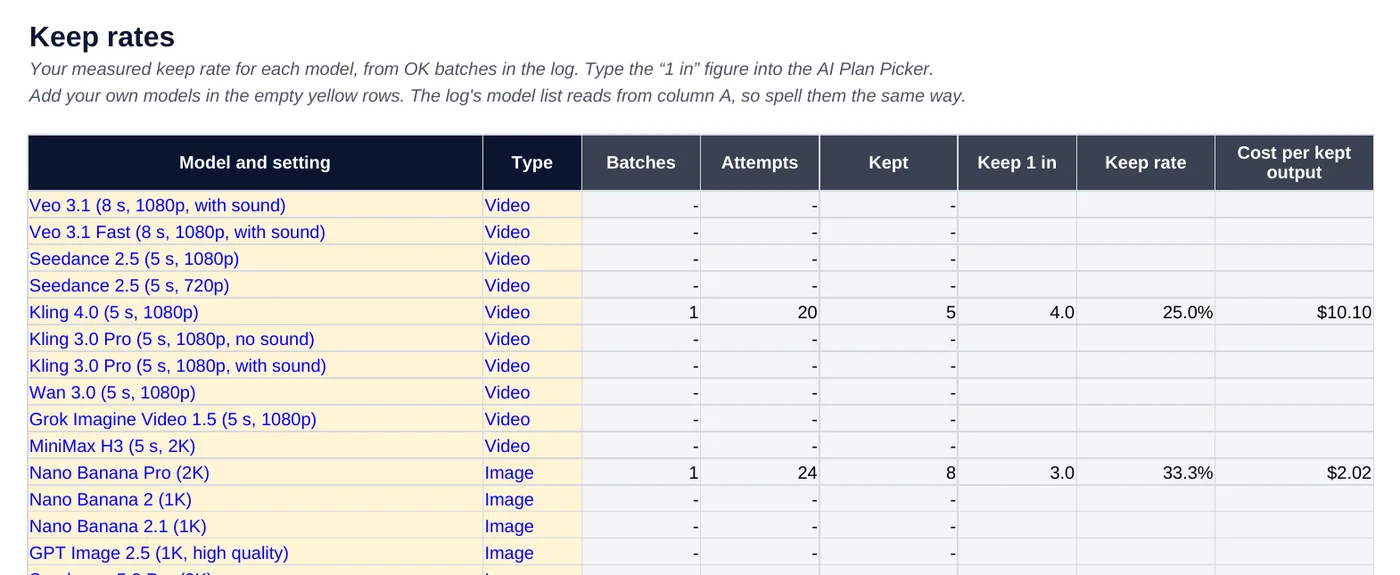
An .xlsx workbook for Excel, Google Sheets or Numbers. Yellow cells are yours to fill in; grey cells are formulas. Each tab has an example row showing the format.
- Production log: 200 batch rows with costs, keep rate and an OK check calculated
- Tool rates: every plan, yearly plan and top-up from the guide, with its price per credit
- Keep rates: your measured keep rate and cost per usable output for each model
- Dashboard: totals, the share of your money spent on failed attempts, and the costliest waste reasons
- Monthly budget, project review, quote check, a 7-day test, a worked example and the full price reference
Two cheat sheets
Platform rules, our advice and our maths, kept apart
- Platform rule
- Stated by the platform on its own pricing or help pages, with the source listed in the guide.
- Cybeauty practice
- Our recommendation from running AI influencers. Sensible, but not a rule.
- Our calculation
- Worked out from published prices, with the method shown next to it.
Prices were checked against each platform’s own pages on November 21, 2026. Sale prices and first-year discounts are marked wherever they appear and never used as the regular price.
Who it’s for
It’s for
- AI influencer operators and studios generating images and video every month
- AI creators paying for one or more of Higgsfield, Magnific, OpenArt, Krea, the Kling app or Dreamina, or paying per attempt through an API
- Anyone quoting AI content work who needs to know their real cost per deliverable
It isn’t
- A generator, or a connection to your platform accounts. Nothing logs in anywhere
- Financial, tax or accounting advice
- A guarantee of savings. Prices change, and your results depend on your own work
How buying and delivery work
- You pay once, $19, through our payment provider’s secure checkout. Dodo Payments processes the payment as merchant of record and adds any sales tax or VAT due where you live, shown before you pay.
- Straight after payment, you get an email with your receipt, the download links for the guide, the workbook and both cheat sheets, and your licence key.
- Open the AI Plan Picker, paste your licence key once, and it unlocks in that browser. A key works on up to three browsers.
- For 12 months, the AI Plan Picker stays unlocked with monthly price checks, and new editions of the guide and workbook arrive by email each quarter.
- After 12 months, the files are yours to keep. Access to the AI Plan Picker and the updates end.
- Format
- PDF guide (49 pages, letter size), .xlsx workbook, two PDF cheat sheets, and an online tool
- Works with
- Any PDF reader; Excel, Google Sheets or Numbers; a current web browser on desktop or phone
- Price
- $19, one-time. No subscription and no automatic renewal
- Licence
- For you and the people who make content with you in the same business, including work for your clients. Not for resale or public sharing
- Refunds
- Digital delivery, final sale. We refund duplicate charges and payment errors, and resend files that don’t arrive
- Store
- Cybeauty One · payments processed by Dodo Payments, merchant of record · contact@cybeautyone.com
Launch list
Get one email when checkout opens
That’s the only email this list sends. If you tell us what you make and what you pay for now, we’ll check those prices first in the AI Plan Picker before launch.
You’re already on the launch list in this browser. We’ll email you once when checkout opens.
Get the kit
AI Creator Cost & Yield Kit
$19 one-time
- The AI Creator Cost & Yield Guide: a 49-page PDF with clickable contents and bookmarks
- The workbook: a 12-tab .xlsx for Excel, Google Sheets or Numbers, with plan prices filled in
- The AI Plan Picker: 12 months of access with your licence key, on up to three browsers
- Two printable cheat sheets: the Draft Ladder and Switching plans
- 12 months of price updates: monthly in the AI Plan Picker, quarterly editions of the guide and workbook
The download links and your licence key arrive by email as soon as payment goes through. Prices are in US dollars; any sales tax or VAT is shown at checkout.
Digital delivery, final sale. We refund a duplicate charge or a payment error, and we resend the files if a download fails. See our Refund Policy, Terms of Service and Privacy Policy. Questions before you buy: contact@cybeautyone.com.
Questions
How is this different from the free cost calculator?
The calculator prices one model at a time: what one clip or image costs after failed attempts. The kit adds what the calculator can’t: the AI Plan Picker ranks every plan for your whole monthly mix, the workbook measures your keep rate from real batches, and the guide explains plans, credits, top-ups, refunds and how to fail less.
Which platforms and models does it cover?
23 model settings across 20 places to run them, from the makers’ own APIs to API platforms and creator apps, listed above. The AI Plan Picker ranks the subscription plans of Higgsfield, Magnific, OpenArt, Krea, the Kling app and Dreamina against pay-as-you-go APIs. Google Flow isn’t ranked, because Veo 3.1 leaves Flow on December 5, 2026, and Midjourney isn’t, because it prices image grids rather than single outputs.
How current are the prices?
Every price was checked against the platform’s own page on November 21, 2026. For 12 months after you buy, the AI Plan Picker’s prices are checked every month, and the guide and workbook get a new edition each quarter. Prices change often, so check the platform’s page before you subscribe.
Do you earn anything from the plans it recommends?
We’re an affiliate partner of Higgsfield and WaveSpeed and may earn a commission if you sign up through our links. The AI Plan Picker and the guide rank every option by price alone, and the affiliate links never change an order or a figure.
Do you need my platform logins?
No. Nothing in the kit connects to your accounts. You type in what you make and what you keep; the AI Plan Picker ranks it on our server without storing it.
What happens after 12 months?
The guide, workbook and cheat sheets are yours to keep. Access to the AI Plan Picker and the price updates end. There’s no automatic renewal and nothing more is charged.
Can I share it with my team?
Yes: the people who make content with you in the same business can use it, including for clients. Please don’t give the files or your licence key to clients or post them anywhere public. Another business needs its own copy.
Can I get a refund?
The kit is delivered digitally and is a final sale. If you were charged twice or the payment went wrong, we refund it. If the files or the licence key don’t arrive, we send them again. The Refund Policy has the details, and your legal rights where you live still apply.
The AI Creator Cost & Yield Kit is an independent guide and tool by Cybeauty One. Apart from our affiliate partnerships with Higgsfield and WaveSpeed, we aren’t affiliated with or endorsed by any platform named here; their names are trademarks of their owners. It is not financial, tax or accounting advice.